
Gateway Integration Guide (1.0.0)
Download OpenAPI specification:
This Guide explains how Merchants can integrate with our Gateway to process payments. While we strive to keep this guide accurate and complete, merchants should always test their integration thoroughly to ensure it meets their technical and business requirements.
Below are the available integration options, which differ in complexity and customer experience.
The following terms are used in this guide:
| Term | Meaning |
|---|---|
| Gateway | The technology system that securely transmits payment data between the merchant, the payment processor, and the acquiring bank. |
| Merchant | The business using Pixxles’s services to accept payments from customers (e.g., an online store).. |
| Our (Pixxles) | The payment facilitator and gateway provider. Pixxles enables merchants to accept payments, processes those payments, and routes them to acquiring banks or other financial institutions. |
| You/your | The Merchant or its representative performing the integration. |
| Acquirer | The bank or financial institution processing a payment. |
| Customer | A Customer of the Merchant making a payment. |
| Card | A payment credit, debit, prepayment or gift card issued by the Card Schemes. |
| Card Scheme | The operator of a payment Card network, such as Visa, Mastercard, etc. |
| Cardholder | The person who owns the payment Card, usually the Customer. |
| Issuer | The bank or financial institution that issued the payment Card to the Cardholder. |
| Merchant Account | An account on the Gateway mapped to an Acquirer-provided account. |
| Hosted Payment Page (HPP) | A page hosted on our secure server used to collect Customer details and process payments. |
| RT Agreements | Recurring Transaction Agreements, a scheduled recurring payment. |
| Solution | Description |
|---|---|
| Direct Gateway Integration | The payment gateway runs on your website, sending transactions directly to the payment processor or bank. This keeps customers on your page for a seamless checkout experience. Request examples |
| Hosted Gateway Integration | The checkout process happens on Pixxles secure payment page. Customers are redirected from your store to complete their payment. Request examples |
| Recurring Transaction Agreements | Supports subscription-based payments, allowing customers to be billed automatically on a set schedule. Settings are flexible to fit your needs. Request examples |
Your website must have an SSL certificate and serve all payment forms via HTTPS if it gathers and/or retains sensitive cardholder data, such as the card number (PAN) or card security code (CVV/CV2).
Direct and Hosted Integration
Authentication uses your merchantId and calculated signature based on signature key provided by Pixxles. Base URLs for sandbox and production will be provided separately.
Request Signing
Each request must include a signature field containing a hash generated from the serialized request plus your signing secret. The Gateway re-generates the hash on receipt and compares it to the one sent:
- If the hashes match, the request is accepted.
- If they differ, the request is considered tampered with, the transaction is aborted, and an error response is returned.
The Gateway also returns a hash of its response in the signature field. You can verify integrity by generating your own hash of the response (excluding the signature field) and comparing.
If request signing is enabled, data POSTed to any callback URL will also be signed.
See the Sample Signature Calculation for implementation details.
RT Agreements
Authentication uses a Bearer token in the Authorization header: Example : “Bearer {token}" The token can be retrieved in the client portal set up for you additionally.
MANDATORY: Each request to Pixxles requires Signature to be signed with
Send requests to the Gateway using an HTTP POST to the integration URL provided.
- Content-Type: application/x-www-form-urlencoded
- Request body: URL-encoded name/value pairs (per RFC 1738)
Complex Fields
For arrays or nested records, use square brackets ([]) to represent dimensions.
- Sub-field names must be numeric or alphanumeric
- Alphanumeric names must not start with a number
- Square brackets must be URL encoded: [ → %5B, ] → %5D
See Payload Formatting for examples.
URL-encoded example:
merchantID=100001&action=SALE&type=1&amount=1001¤cyCode=826&countryCode=826&transactionUnique=wc_order_QzMX3qltKrrEX-630cd01b496c33&orderRef=Test+purchase&customerPostCode=NN17+8YG&responseCode=0&responseMessage=AUTHCODE%3A350333&state=captured&xref=15091702MG47WN32MM88LPK&cardNumber=4929+4212+3460+0821&cardExpiryDate=1215&items%5B0%5D%5Bdescription%5D=Newspaper&items%5B0%5D%5Bquantity%5D=1&items%5B0%5D%5Bamount%5D=110&items%5B1%5D%5Bdescription%5D=Chocolate+bar&items%5B1%5D%5Bquantity%5D=3&items%5B1%5D%5Bamount%5D=249&items%5B2%5D%5Bdescription%5D=Carrier+bag&items%5B2%5D%5Bquantity%5D=1&items%5B2%5D%5Bamount%5D=1
Notes:
- Field and sub-field names must be alphanumeric
- Names are case-sensitive
- Root integration fields must be numeric only
- Alphanumeric fields must not begin with a number
HTTP Responses
- Responses use the same URL-encoding format as requests
- All request fields are returned, along with any additional response fields
- If a field exists in both the request and the response, the response value will overwrite the request value
The Gateway may introduce new response fields at any time. Your integration should ignore unrecognized fields until you choose to support them.
A request can contain up to 255 POST parameters. To allow space for response fields, use no more than 200 parameters in your request.
MANDATORY: Each request to Pixxles requires Signature to be signed with
By default, responses are URL-encoded, unless a threeDSRedirectURL field is provided. In this case, the Gateway will return an HTML page that auto-redirects the browser to that URL via HTTP POST. This allows you to collect the cardholder’s payment details on your server, submit them via Direct Integration, and then have the Gateway POST the results back to your server for you to display the outcome.
Request/Response Fields
- All request fields are echoed back in the response
- Merchants may add custom request fields
- If a field appears in both the request and the response, the response value will overwrite the request value
- The Gateway may add new fields at any time — your integration must:
- Use only documented request fields, or custom fields with names that are unlikely to overlap (e.g., prefix them with your own namespace)
- Ignore any unknown response fields until you choose to support them
Examples:
The Direct Integration allows you to keep the Customer on your system throughout the checkout process, collecting the Customer’s payment details on your own secure server before sending the collected data to the Gateway for processing. This allows you to provide a smoother, more complete checkout process to the Customer.
The Direct Integration also supports additional operations like refunds and cancellations.
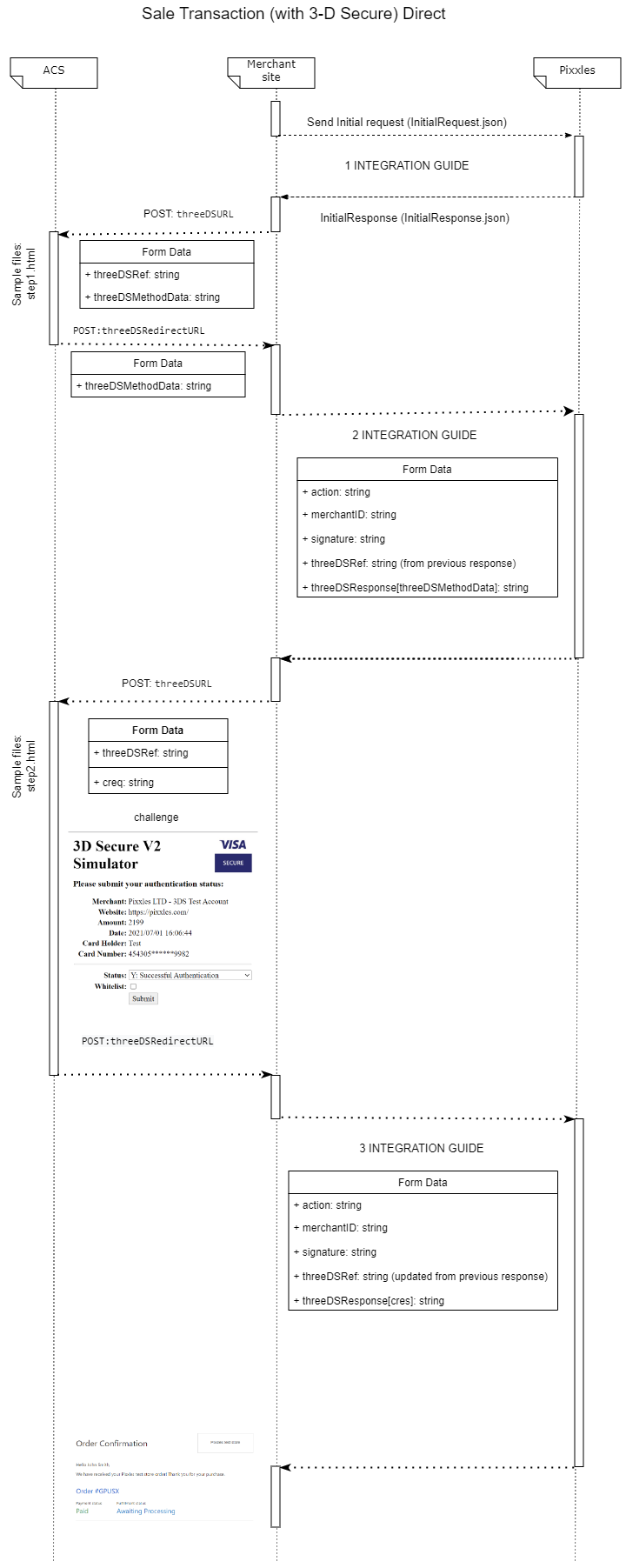
Transaction Flow
The entire Transaction Flow could be divided into 3 stipulated steps:
- Initial Request
- Continuation Request
- 3DS Challenge Results
Step 1 – Initial Request Send the initial request to Pixxles with payment details, device information, any required threeDSOptions, and your callback page in the threeDSRedirectURL field. - If the response includes a responseCode other than 65802, the transaction is complete - it can be either successful or declined. You can display the result using responseCode and responseStatus. - If the Gateway determines that the transaction is eligible, it will respond with a responseCode of 65802 (3DS AUTHENTICATION REQUIRED) and with additional fields like threeDSRef, threeDSRequest and threeDSURL fields. Store the received threeDSRef value as it will be needed by the continuation request to Pixxles. Next, send the contents of the received threeDSRequest[threeDSMethodData] to the ACS at the provided threeDSURL via HTTP POST. This is usually implemented using hidden HTML inputs in a form rendered inside an IFRAME on the cardholder’s browser. The IFRAME must be large enough to display the challenge screen, unless threeDSRequest contains a threeDSMethodData component—in that case the challenge is invisible and a small hidden IFRAME can be used. The ACS will then return the result (threeDSMethodData) to your callback page (the one you set in threeDSRedirectURL).
Step 2 – Continuation Request Next, send a continuation request to Pixxles containing the stored threeDSRef and the threeDSResponse[threeDSMethodData] received from the ACS. Pixxles will respond with an updated threeDSRef and a new threeDSRequest[creq]. Store these values, then send the creq along with the threeDSRef to the ACS. If the challenge succeeds, the ACS will return a CRes value.
Step 3 – Challenge Results Finally, send the stored threeDSRef together with the threeDSResponse[cres] received from the ACS back to Pixxles. If the authentication was successful, Pixxles will return a response with responseCode = 0, which you can use to display a transaction confirmation to the customer.
Requests should have a Content-Type: application/x-www-form-urlencoded HTTP header and the request should be name-value pairs URL encoded as per RFC 1738
Each request should be signed. Signing details: Sample Signature Calculation.
For closer look be sure to check Request\Response Examples and Schemas.
Capture Delay allows you to delay payment capture after authorisation. This gives you time to review the order and, if needed, cancel the transaction or adjust the settlement amount before funds are captured, helping reduce fraud-related chargebacks.
Without Capture Delay, payments are authorised and captured immediately.
With Capture Delay, the payment is only authorised at checkout and captured later — automatically after a specified delay (0–30 days) or manually if -1 / never is used.
To create a transaction with Capture Delay, you need to send a standard SALE request with the additional captureDelay field.
MANDATORY: Each request to Pixxles requires Signature to be signed with
Hosted Integration provides the quickest way to add secure payment processing to your ecommerce site. Instead of collecting card details yourself, you redirect the customer to our Hosted Payment Page, where the Gateway securely collects payment information and processes the transaction. After payment, the customer is redirected back to a page on your site with the transaction outcome.
The response is sent to your return page as an application/x-www-form-urlencoded HTTP POST.
The Gateway may introduce new request and response fields at any time. To maintain compatibility, only use documented request fields, or clearly prefixed custom fields to avoid naming conflicts. Your integration should ignore any response fields it does not recognize until you choose to support them.
An example of a Hosted Integration request is provided here and sample code is provided here.
Transaction Flow
Initial Request flow is similar to Direct Integration and can be sent to Pixxles by submitting an HTTP POST request to the Hosted integration URL provided.
The request should have a Content-Type: application/x-www-form-urlencoded HTTP header and the request should be name-value pairs URL encoded as per RFC 1738.
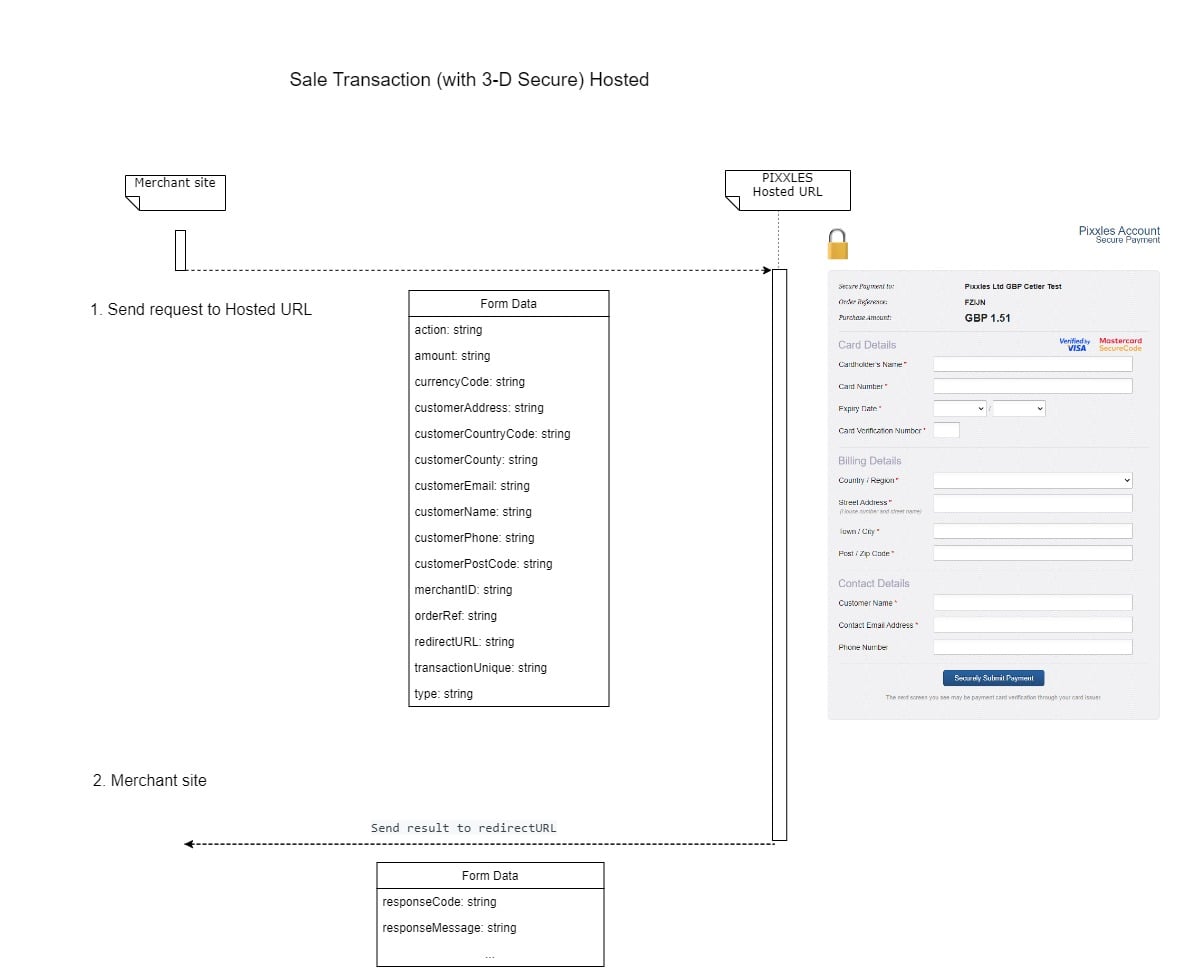
Each request should be signed. Signing details: Sample Signature Calculation.
For closer look be sure to check Request Examples.
MANDATORY: Each request to Pixxles requires Signature to be signed with
Create an RT Agreement using gateway-based scheduling
In order to create an RT (recurring transaction) agreement where recurring scheduling is controlled by the gateway, Direct Integration is required first.
The initial request is similar to the one in the documentation, with a few differences. The gateway supports the following actions in case of gateway-based scheduled RT agreements:
- SALE - creates a new RT agreement and debits the card immediately. The transaction is run as a normal SALE transaction, but is to be appended with "rt*" type of fields.
- VERIFY - just checks the credit card validity with no actual debit from the card. If "VERIFY" action is used, then "amount" must always be "0", and "rt*" type of fields need to be passed. Below is an example of an initial request that creates an RT agreement.
Request Example
{
"action": "VERIFY",  //VERIFY or SALE
"amount": "0", // should be always 0 if VERIFY
"cardCVV": "356",
"cardExpiryMonth": "12",
"cardExpiryYear": "24",
"cardNumber": "4929 4212 3460 0821",
"currencyCode": "GBP",
"customerAddress": "Flat 6 Primrose Rise 347 Lavender Road Northampton GB",
"customerCountryCode": "GB",
"customerEmail": "[email protected]",
"customerName": "John Smith",
"customerPhone": "442081264154",
"customerPostcode": "NN17 8YG",
"customerTown": "Northampton",
"customerCounty": "Northamptonshire",
"deviceAcceptCharset": "",
"deviceAcceptContent":
"text/html:application/xhtml+xml:application/xml;q=0.9:image/avif:image/webp:image/apng:*/*;q=0.8:application/signed-exchange;v=b3;q=0.9",
"deviceAcceptEncoding": "gzip: deflate: br",
"deviceAcceptLanguage": "en-US",
"deviceCapabilities": "javascript",
"deviceChannel": "browser",
"deviceIdentity": "Mozilla/5.0 (Windows NT 10.0; Win64; x64) AppleWebKit/537.36 (KHTML: like Gecko) Chrome/95.0.4638.54 Safari/537.36",
"deviceScreenResolution": "1920x1080x24",
"deviceTimeZone": "-120",
"merchantID": "100001",
"orderRef": "43",
"remoteAddress": "192.168.1.1",
"threeDSRedirectURL": "https://localhost/acs",
"transactionUnique": "wc_order_QzMX3qltKrrEX-630cd01b496c33", // Guid.NewGuid().ToString()
"type": "1",
"rtCycleAmount":"200", // required, repeated transaction amount, the last two digits are always decimal places, so in this example it is 2.00
"rtAgreementType":"recurring", // required, should be always recurring
"rtCycleDuration":"1", // required, number of duration units
"rtCycleDurationUnit":"day", // required, accepted values: day, week, month, year
"rtCycleCount":"5", //required, denotes the number of durationUnits until the agremeent is completed; put 0 if Agreement should never end
"rtName": "agreementName", //optional, but should be unique. Will be generated automatically if doesn't contain a value
"rtDescription": "Order for##", //optional. Will be generated automaticly if doesn't contain a value
"rtPolicyRef":"ORD_POL_REF12", //optional, but should be unique. Will be generated automaticly if doesn't contain a value
"rtStartDate":"04/18/2023 06:50:13" // required
}
In the example above, GBP 2.00 will be debited every 1 day for 5 days, starting on 04/18/2023 06:50:13
Running recurring transactions using client-based scheduling
It is also possible to run recurring transactions with scheduling controlled on the merchant side. This always involves an initial transaction marked for recurring, and subsequent transactions that are based on the initial one.
To run the initial transaction that will be used as a ground for all other recurring transactions for an order, you need to create an initial transaction as described in the Direct Integration guide, but with the addition of rtAgreementType = 'recurring'.
When the time for the next recurring transaction comes, a simplified request needs to be sent using xref received from the previous transaction:
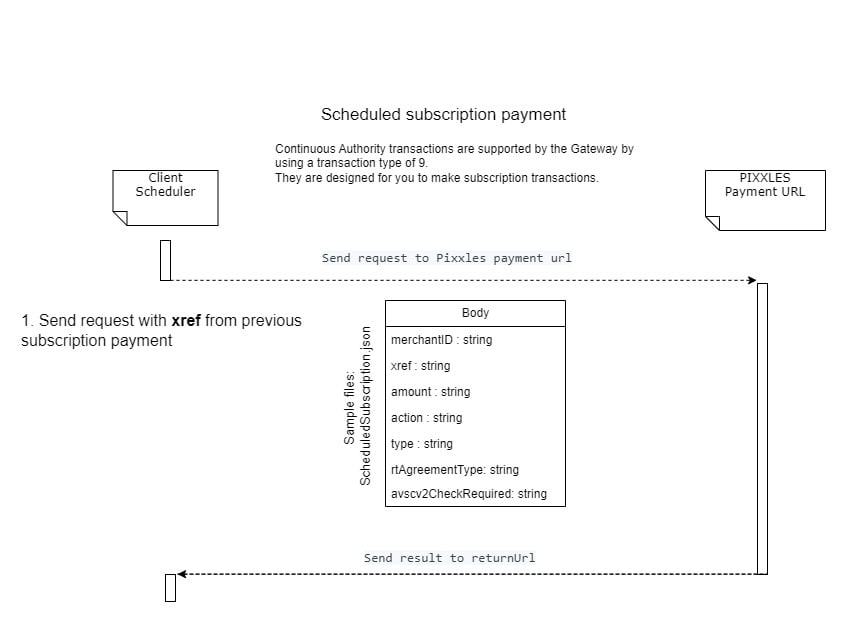
{
    "merchantID": "{merchantID}",
    "xref": "{xref}",
    "amount": "{amount}",
    "action": "SALE",
    "type": "9",
    "rtAgreementType": "recurring",
    "avscv2CheckRequired": "N",
    "signature": "{signature}"
}
Note type of 9 in this example which tells the gateway that this is a recurring transaction.
RT Agreements API
Authentication
Authentication requires Bearer token passed via Authorization Header. The token can be retrieved in the client portal.
Example : “Bearer {token}"
Headers
Content-Type: application/json Authorization: Bearer {token}
HTTP Response Codes
- 200 – Succeeded
- 400 - Bad Request
- 401 – Unauthorized
- 500 - Internal Server Error
Get Agreements
POST {{baseURL}}/api/Agreement/get
REQUEST Example
Query parameters are passed in Body as JSON
{
  "Id ": "string", // optional. Search is performed by AgreementId field, using Contains method
  "sort": "string", // optional, must be used in pair with "sortOrder". Pass a field name to be used for sorting
  "sortOrder": "string", // optional, must   be used in pair with "sort" parameter. Must be “asc” or “desc”.
  "page": 0,  //required, must be greater than 0
  "pageSize": 0  // required, must be greater than 0
}
RESPONSE example
totalCount and a list of agreements are returned
{
      "merchantEntityId": "132779",
      "mrpn": "b18d-c815-420f-0755",
      "Id": 25,
      "name": "RTA: b18d-c815-420f-0755",
      "description": null,
      "policyReference": "b18d-c815-420f-0755",
      "agreementType": "recurring",
      "startDate": "2023-01-16T00:00:00Z",
      "initialPayment": 1,
      "initialPaymentDate": "2023-01-16T00:00:00Z",
      "currency": "GBP",
      "paymentCount": 3,
      "cycleAmount": 1,
      "cycleDuration": 2,
      "cycleDurationUnit": "day",
      "cycleCount": 3,
      "lastTransactionId": null,
      "finalPayment": 1,
      "finalPaymentDate": "2023-01-20T00:00:00Z",
      "nextPayment": null,
      "balance": 3,
      "state": "expired"
    }
Stop Agreement
PUT {{baseURL}}/api/Agreement/{id}/stop
You can stop any agreement that has been started and has not expired yet.
RESPONSE example
{
  "successfully": false,
  "text": "Failed to stop agreement"
}
Delete Agreement
DELETE {{baseURL}}/api/Agreement/{id}
You can delete any agreement that has never been started.
RESPONSE example
{
  "successfully": false,
  "text": "Failed to delete agreement"
}
For closer look be sure to check Request Examples.
If the Gateway cannot be reached due to a network or communications error, you may receive an HTTP status code in the 500–599 range. In these cases, you may retry the transaction, but only with a limited number of attempts and increasing delay between retries (exponential backoff).
During scheduled maintenance, the Gateway will return 503 Service Temporarily Unavailable. In this case, retry only after the maintenance window has ended. Maintenance times and durations will be communicated to you in advance by email.
To ensure reliable processing:
Always send requests over HTTPS (HTTP is not supported and will not be redirected).
Process transactions sequentially rather than concurrently.
Wrap each transaction in try/catch logic to detect failures and retry based on the HTTP status or return code.
Design your integration so a single failed transaction does not halt the entire batch. Log failures for review, then continue with the next transaction.
The redirectURL field specifies a page on your server where the customer is redirected after payment processing.
Hosted Integration – After the Hosted Payment Page completes, the customer’s browser is redirected to this URL via HTTP POST. The POST contains transaction response data, which you can use to continue the checkout journey on your site (e.g., confirmation, error handling).
Direct Integration – You may design your own HTML form that posts payment details directly to the Gateway, bypassing your server so sensitive card data is never exposed. The Gateway then responds with a redirect to your redirectURL via HTTP GET, including transaction response data. This approach is optional and not recommended, as it makes message signing more difficult.
The URL is mandatory for the Hosted Integration and optional for the Direct Integration.
The redirectURL must be a fully qualified URL including at least the scheme (https://) and host.
It is strongly recommended that the response data sent to the redirectURL be used to display a payment confirmation page only and not used to update your backend systems. The Customer may close their browser before the redirection happens resulting in you never receiving this data.
The following projects consist of examples in code on how to integrate with Pixxles:
Every request must specify the action to perform using the Action field:
- Direct Integration: supports all actions.
- Hosted Integration: supports only SALE.
SALE
Creates a new transaction and requests authorisation for a sale from the Acquirer. A successful authorisation reserves funds on the cardholder’s account until the transaction is settled.
VERIFY
Creates a transaction to verify that the card account exists with the Acquirer. No funds are transferred and no hold is placed; the transaction cannot be captured or settled. The transaction amount must always be zero.
REFUND_SALE
This action can be used only for transactions in 'Accepted' state.
Creates a refund for a previous SALE. It can only be used for transactions in the Accepted state and must reference the original transaction using the xref field. Refunds are generally allowed up to a year after the original sale, though some card schemes or acquirers may impose shorter limits. Partial refunds are supported, provided the requested amount does not exceed the remaining balance of the original sale. Multiple partial refunds can be issued until the full amount has been returned. If the original transaction has not yet been settled, it is recommended to use the CANCEL action instead of REFUND_SALE.
CANCEL
This action can be used only for transactions in 'Captured' state.
This action is intended for transactions that have been authorised but not yet settled. It prevents the transaction from being settled and is irreversible once performed. The transaction must be identified using the xref field. Depending on the acquirer, cancelling may not immediately release the reserved funds; in such cases, the authorisation will expire naturally, which can take up to about 30 days. Merchants should use CANCEL for unsettled transactions and reserve REFUND_SALE for already settled transactions.
QUERY
Looks up an existing transaction using the xref field and returns the original response.
CAPTURE
This request captures a previously authorised transaction using the xref field, making it available for settlement. It can only be used for transactions that were authorised but not yet captured due to Capture Delay. A partial capture amount can be specified, but it must not exceed the originally authorised amount. Capture is typically available for up to 30 days after authorisation, depending on Card Scheme and Acquirer rules. This action is not supported by the Hosted Integration.
The Gateway always returns a numeric responseCode to indicate the status of a transaction. Use responseCode rather than responseMessage to determine the transaction outcome.
Response codes are grouped for informational purposes only. Not all codes within a group are used, and some exist for completeness or future use. A responseCode of 0 always indicates a successful transaction.
The Gateway maps authorisation responses from the Acquirer to a standard set of numeric codes, based on the 2-character ISO 8583 response codes.
- Some ISO 8583 codes are non-numeric; these are mapped to numeric equivalents greater than 99. The mapping is shown in the reference table, alongside the original 2-character code.
- Not all ISO 8583 codes are relevant to transactions supported by the Gateway. Codes that are not currently applicable are documented for reference but may not be returned.
- If the Acquirer does not provide a suitable ISO 8583 code, the Gateway attempts to map it to an appropriate numeric code.
The original Acquirer response is always included in the acquirerResponseCode and acquirerResponseMessage fields. Note that these original codes may be non-numeric.
| Code | Description |
|---|---|
| 0 | Successful approval/completion |
| 1 | Refer to card issuer |
| 2 | Refer to card issuer, special condition |
| 3 | Invalid merchant or service provider |
| 4 | Pickup card |
| 5 | Do not honor |
| 6 | Error |
| 7 | Pickup card, special condition (other than lost/stolen card) |
| 8 | Honor with identification |
| 9 | Request in progress |
| 10 | Approval for partial amount |
| 11 | Approved VIP |
| 12 | Invalid transaction |
| 13 | Invalid amount (currency conversion field overflow), or amount exceeds maximum for card program |
| 14 | Invalid card number/account number |
| 15 | No such issuer |
| 16 | Approved, Update Track 3 |
| 17 | Customer cancellation |
| 18 | Customer dispute |
| 19 | Re-enter transaction |
| 20 | Invalid response/Acquirer error |
| 21 | No action taken (unable to back out prior transaction) |
| 22 | Suspected malfunction |
| 23 | Unacceptable transaction |
| 24 | File update impossible |
| 25 | Reference number cannot be found. Unable to locate record in file, or account number is missing from the inquiry |
| 26 | Duplicate reference number |
| 27 | Error in reference number |
| 28 | File is temporarily unavailable for update |
| 29 | File action failed/Contact acquirer |
| 30 | Format error |
| 31 | Bank not supported by Switch/Unknown acquirer account code |
| 32 | Complete partially |
| 33 | Pickup card (expired) |
| 34 | Pickup card (suspected fraud) |
| 35 | Pickup card (acceptor contact acquirer) |
| 36 | Pickup card (restricted card) |
| 37 | Pickup card (acceptor call acquirer security) |
| 38 | Pickup card (PIN tries exceeded) |
| 39 | No credit account |
| 40 | Function not supported. |
| 41 | Pickup card (lost card) |
| 42 | No universal account |
| 43 | Pickup card (stolen card) |
| 44 | No investment account |
| 45 | Account closed |
| 46 | Identification required |
| 47 | Identification cross-check required |
| 48 | No from account |
| 49 | No to account |
| 50 | No account |
| 51 | Insufficient funds |
| 52 | No checking account |
| 53 | No savings account |
| 54 | Expired card |
| 55 | Incorrect PIN |
| 56 | Unknown card |
| 57 | Transaction not permitted to cardholder |
| 58 | Transaction not allowed at terminal |
| 59 | Suspected fraud |
| 60 | Contact acquirer |
| 61 | Exceeds withdrawal amount limit |
| 62 | Restricted card (for example, in Country Exclusion table) |
| 63 | Security violation |
| 64 | Amount higher than previous transaction |
| 65 | SCA Required (previously, Exceeds withdrawal limit) |
| 66 | Contact acquirer |
| 67 | Hard capture - ATM |
| 68 | Time out |
| 69 | Advice received too late. |
| 70 | Contact card issuer |
| 71 | Message flow error |
| 72 | Authorization centre not available for 60 seconds. |
| 73 | Authorization centre not available for 300 seconds. |
| 74 | PIN entry necessary |
| 75 | Allowable number of PIN tries exceeded |
| 76 | Unable to locate previous message (no match on Retrieval Reference number) |
| 77 | Previous message located for a repeat or reversal, but repeat or reversal data are inconsistent with original message |
| 78 | Blocked, first used. The transaction is from a new cardholder, and the card has not been unblocked |
| 79 | Already reversed |
| 80 | Visa transactions: credit issuer unavailable. Private label and check acceptance: Invalid date |
| 81 | PIN cryptographic error found (error found by VIC security module during PIN decryption) |
| 82 | Negative CAM, dCVV, iCVV, or CVV results |
| 83 | STIP cannot approve |
| 84 | Pre-auth time too great |
| 85 | No reason to decline a request for account number verification, address verification, CVV2 verification, or a credit voucher or merchandise return |
| 86 | Unable to verify PIN |
| 87 | Purchase amount only, no cash back allowed |
| 88 | Unable to authorise |
| 89 | Ineligible to receive |
| 90 | Cut-off in progress |
| 91 | Issuer unavailable or switch inoperative (STIP not applicable or available for this transaction) |
| 92 | Destination cannot be found for routing |
| 93 | Transaction cannot be completed, violation of law |
| 94 | Duplicate transaction |
| 95 | Reconcile error |
| 96 | System malfunction |
| 97 | Security Breach |
| 98 | Date and time not plausible |
| 99 | Error in PAC encryption detected. |
| 497 (B1) | Surcharge amount not permitted on Visa cards (U.S. acquirers only) |
| 498 (B2) | Surcharge not supported |
| 928 (N0) | Unable to authorise |
| 931 (N3) | Cash service not available |
| 932 (N4) | Cashback request exceeds issuer limit |
| 933 (N5) | Resubmitted transaction over max days limit |
| 935 (N7) | Decline for CVV2 failure |
| 936 (N8) | Transaction amount greater than pre-authorised approved amount |
| 1002 (P2) | Invalid biller information |
| 1005 (P5) | PIN Change/Unblock request declined |
| 1006 (P6) | Unsafe PIN |
| 1037 (Q1) | Card Authentication failed |
| 1072 (R0) | Stop Payment Order |
| 1073 (R1) | Revocation of Authorization Order |
| 1074 (R1) | Revocation of All Authorizations Order |
| 1144 (T0) | Approval, keep first check |
| 1145 (T1) | Check OK, no conversion |
| 1146 (T2) | Invalid RTTN |
| 1147 (T3) | Amount greater than limit |
| 1148 (T4) | Unpaid items, failed NEG |
| 1149 (T5) | Duplicate check number |
| 1150 (T6) | MICR error |
| 1151 (T7) | Too many checks |
| 1298 (XA) | Forward to issuer |
| 1301 (XD) | Forward to issuer |
| 1363 (Z3) | Unable to go online. |
The Gateway uses a set of enhanced response codes to indicate issues that prevent an authorisation response from being received from the Acquirer. These codes start at 65536.
General Error Codes: 65536 - 65791
| Code | Description |
|---|---|
| 65536 | Transaction in progress. Contact customer support if this error occurs. |
| 65537 | A general error has occurred. |
| 65538 | Reserved for future use. Contact customer support if this error occurs. |
| 65539 | Invalid Credentials: merchantID is unknown or the signature doesn’t match. |
| 65540 | Permission denied: caused by sending a request from an unauthorised IP address. |
| 65541 | Action not allowed: action is not supported by the Acquirer or allowed for the transaction. |
| 65542 | Request Mismatch: fields sent while completing a request do not match initially requested values. Usually due to sending different card details to those used to authorise the transaction when completing a 3-D Secure transaction or performing a REFUND_SALE transaction. |
| 65543 | Request Ambiguous: request could be misinterpreted due to inclusion of mutually exclusive fields. |
| 65544 | Request Malformed: could not parse the request data. |
| 65545 | Suspended Merchant account. |
| 65546 | Currency not supported by Merchant. |
| 65547 | Request Ambiguous, both taxValue and discountValue provided when should be one only. |
| 65548 | Database error. |
| 65549 | Payment processor communications error. |
| 65550 | Payment processor error. |
| 65551 | Internal Gateway communications error. |
| 65552 | Internal Gateway error. |
| 65553 | Encryption error. |
| 65554 | Duplicate request. |
| 65555 | Settlement error. |
| 65556 | AVS/CV2 Checks are not supported for this card (or Acquirer). |
| 65557 | IP Blocked: Request is from a banned IP address. |
| 65558 | Primary IP blocked: Request is not from one of the primary IP addresses configured for this Merchant Account. |
| 65559 | Secondary IP blocked: Request is not from one of the secondary IP addresses configured for this Merchant Account. |
| 65560 | Reserved for future use. Contact customer support if this error occurs. |
| 65561 | Unsupported Card Type: Request is for a card type that is not supported on this Merchant Account. |
| 65562 | Unsupported Authorisation: External authorisation code authorisationCode has been supplied and this is not supported for the transaction or by the Acquirer. |
| 65563 | Request not supported: The Gateway or Acquirer does not support the request. |
| 65564 | Request expired: The request cannot be completed as the information is too old. |
| 65565 | Request retry: The request can be retried later. |
| 65566 | Invalid card number: A test card was used on a live Merchant Account. Or Disallowed card number: A live card was used on a test Merchant Account. |
| 65567 | Unsupported card issuing country: Request is for a card issuing country that is not supported on this Merchant Account. |
| 65568 | Masterpass processing error. |
| 65569 | Masterpass not supported. |
| 65570 | Masterpass checkout failure. |
| 65571 | Masterpass checkout success. |
| 65572 | Masterpass checkout is required. |
| 65573 | Amounts error. Provided transaction amounts to not tally. |
| 65574 | Reserved for future use. Contact customer support if this error occurs. |
| 65575 | No data was found that match the selection criteria. |
| 65576 | Request cancelled. |
| 65792 | 3-D Secure processing in progress. |
| 65793 | 3-D Secure processing error. |
| 65794 | 3-D Secure processing is required. 3-D Secure ACS challenge must be displayed. |
| 65795 | 3-D Secure processing is not required. |
| 65796 | 3-D Secure is not supported for this request: No versions of 3DS are supported for this request. Or 3DS processing not supported: request has threeDSRequired=Y but the Merchant Account isn’t enabled for 3DS or required to do 3DS. |
| 65797 | Error occurred during 3-D Secure enrolment check. |
| 65798 | Reserved for future use. |
| 65799 | Reserved for future use. |
| 65800 | Error occurred during 3-D Secure authentication check. |
| 65801 | Reserved for future use. |
| 65802 | 3-D Secure authentication is required. |
| 65803 | 3-D Secure authentication results do not meet the Merchant’s preferences. |
| 65804 | 3-D Secure authentication was successful. |
Hosted Integration
Transaction Request HTTP Headers
The following HTTP headers are sent for transaction request:
| HTTP Header | Mandatory | Description |
|---|---|---|
| content-type | Y | Content type of the request. This must be ‘application/x-www-form-urlencoded’, A charset parameter is optional and any non UTF-8 request will be converted to UTF-8. |
Transaction Response HTTP Headers
The following HTTP headers are received for a transaction response:
| HTTP Header | Description |
|---|---|
| Status | HTTP status header. Possible value are: 200 – Transaction request processed 500 – Internal Server Error 503 – Service Temporarily Unavailable |
| content-type | Content type of the response. This will be ‘application/x-www-form-urlencoded' |
Submission Example
The following shows an example of a transaction request:
HTTP/1.1 200 OK
POST /hosted/ HTTP/1.1
Host: gateway.example.com
Accept: */*
Content-Length: 314
Content-Type: application/x-www-form-urlencoded
merchantID=100001&action=SALE&type=1¤cyCode=826&countryCode=826&amount=680&transactionUnique=5de651c7c5379&orderRef=Test+Transaction&redirectURL=https%3A%2F%2Fmyshop.com&signature=ba12b0766a3412782448f154be15e8f61eea390387b1b23d4688c82c9f28f81df593de5890426546cca365943cc7b5c4897c9721b663a0e17680e1e796f1ad55
The following shows an example of a transaction response:
HTTP/1.1 200 OK
Date: Tue, 01 Jan 2019 09:30:45 GMT
Server: Apache/2.4.23 (Win64) OpenSSL/1.0.2k-fips PHP/5.4.12
Vary: Host
X-Powered-By: PHP/5.4.12
Expires: Thu, 19 Nov 1981 08:52:00 GMT
Cache-Control: no-store, no-cache, must-revalidate, post-check=0, pre-check=0
Pragma: no-cache
Content-Length: 4129
Content-Type: text/html

<!DOCTYPE html>
<html>
--- Hosted Payment Page HTML Removed ---
</html>
Direct Integration
Transaction Request HTTP Headers
The following HTTP headers are sent for transaction request:
| HTTP Header | Mandatory | Description |
|---|---|---|
| content-type | Y | Content type of the request. This must be ‘application/x-www-form-urlencoded’, A charset parameter is optional and any non UTF-8 request will be converted to UTF-8. |
Transaction Response HTTP Headers
The following HTTP headers are received for a transaction response:
| HTTP Header | Description |
|---|---|
| Status | HTTP status header. Possible value are: 200 – Hosted Payment Form returned 500 – Internal Server Error 503 – Service Temporarily Unavailable |
| content-type | Content type of the response. This will be ‘application/x-www-form-urlencoded' |
Submission Example
The following shows an example of a transaction request:
POST /direct/ HTTP/1.1
Host: gateway.example.com
Accept: */*
Content-Length: 397
Content-Type: application/x-www-form-urlencoded
merchantID=100001&action=SALE&type=1¤cyCode=826&countryCode=826&amount=680&transactionUnique=5de65b552499e&orderRef=Test+Transaction&cardNumber=4929+4212+3460+0821&cardCVV=356&cardExpiryDate=1219&threeDSRequired=N&avscv2CheckRequired=N&duplicateDelay=0&signature=06b01e06c8fc761943d676d5f3aa2e9264758fed72e7bcb058a2a35cf23e8e45403099537bb0363054d6bc8ea951ce1ad86e582dbf0b435855b9c97507fcf844
The following shows an example of a transaction response:
HTTP/1.1 200 OK
Date: Tue, 01 Jan 2019 09:30:45 GMT
Server: Apache/2.4.23 (Win64) OpenSSL/1.0.2k-fips PHP/5.4.12
Vary: Host
X-Powered-By: PHP/5.4.12
Content-Length: 2449
Content-Type: text/html
merchantID=100001&threeDSEnabled=Y&avscv2CheckEnabled=Y&riskCheckEnabled=N&caEnabled=Y&rtsEnabled=Y&cftEnabled=Y&threeDSCheckPref=not+known%2Cnot+checked%2Cauthenticated%2Cattempted+authentication&cv2CheckPref=matched&addressCheckPref=not+known%2Cnot+checked%2Cmatched%2Cpartially+matched&postcodeCheckPref=not+known%2Cnot+checked%2Cmatched%2Cpartially+matched&cardCVVMandatory=Y&riskCheckPref=not+known%3Dfinished%2Cnot+checked%3Ddecline2%2Capprove%3Dcontinue%2Cdecline%3Ddecline1%2Creview%3Ddecline2%2Cescalate%3Dfinished¬ifyEmail=an.operator%40merchant.com&customerReceiptsRequired=Y&merchantCategoryCode=6013&surchargeEnabled=Y&surchargeRequired=N&surchargeRules%5B0%5D%5BcardType%5D=CC&surchargeRules%5B0%5D%5Bsurcharge%5D=10.1235&surchargeRules%5B1%5D%5BcardType%5D=CC&surchargeRules%5B1%5D%5Bcurrency%5D=GBP&surchargeRules%5B1%5D%5Bsurcharge%5D=2.5000&surchargeRules%5B2%5D%5BcardType%5D=VC&surchargeRules%5B2%5D%5Bsurcharge%5D=3.5000&surchargeRules%5B3%5D%5BcardType%5D=VC&surchargeRules%5B3%5D%5Bcurrency%5D=GBP&surchargeRules%5B3%5D%5Bsurcharge%5D=4.5000&surchargeRules%5B4%5D%5BcardType%5D=DD&surchargeRules%5B4%5D%5Bsurcharge%5D=5.5000&action=SALE&type=1¤cyCode=826&countryCode=826&amount=680&transactionUnique=5de65b552499e&orderRef=Test+Transaction&cardExpiryDate=1219&threeDSRequired=N&avscv2CheckRequired=N&duplicateDelay=0&requestID=5de65b562496f&responseCode=0&responseMessage=AUTHCODE%3A347414&state=captured&requestMerchantID=100001&processMerchantID=100001&paymentMethod=card&cardType=Visa+Credit&cardTypeCode=VC&cardScheme=Visa+&cardSchemeCode=VC&cardIssuer=BARCLAYS+BANK+PLC&cardIssuerCountry=United+Kingdom&cardIssuerCountryCode=GBR&cardFlags=8323072&cardNumberMask=492942%2A%2A%2A%2A%2A%2A0821&cardNumberValid=Y&xref=19120312NG55CM51QH35JRL&cardExpiryMonth=12&cardExpiryYear=19&authorisationCode=347414&transactionID=10018201&responseStatus=0×tamp=2019-12-03+12%3A55%3A52&amountApproved=680&amountReceived=680&amountRetained=680&avscv2ResponseCode=244100&avscv2ResponseMessage=SECURITY+CODE+MATCH+ONLY&avscv2AuthEntity=merchant+host&cv2Check=matched&addressCheck=not+matched&postcodeCheck=not+matched¬ifyEmailResponseCode=0¬ifyEmailResponseMessage=Email+successfully+queued&vcsResponseCode=0&vcsResponseMessage=Success+-+no+velocity+check+rules+applied¤cyExponent=2&signature=e5c65e5d0340e0ec0de8782affcb6caba2e4d202a6873a1677ddbf6415cb1dd52cc597e43c758b233afd121367d300a57d0faade7abf6b4b88a1a1b974e55d33
This section provides samples of how to integrate with the Gateway using the PHP scripting language to communicate directly with the API without the use of any our SDKs.
Hosted Integraion
Sale Transaction
The following example PHP code shows how to send a SALE transaction:
<?PHP
// Signature key entered on MMS. The demo account is fixed to this value,
$key = 'Circle4Take40Idea';

// Gateway URL
$url = 'https://gateway.example.com/hosted/';


if (!isset($_POST['responseCode'])) {
    // Send request to gateway

    // Request
    $req = array(
        'merchantID' => '100001',
        'action' => 'SALE',
        'type' => 1,
        'countryCode' => 826,
        'currencyCode' => 826,
        'amount' => 1001,
        'orderRef' => 'Test purchase',
        'transactionUnique' => uniqid(),
        'redirectURL' => ($_SERVER['HTTPS'] == 'on' ? 'https' : 'http') . '://' . $_SERVER['HTTP_HOST'] . $_SERVER['REQUEST_URI'],
    );

    // Create the signature using the function called below.
    $req['signature'] = createSignature($req, $key);

    echo '<form action="' . htmlentities($url) . '" method="post">' . PHP_EOL;

    foreach ($req as $field => $value) {
        echo '    <input type="hidden" name="' . $field . '" value="' . htmlentities($value) . '">' . PHP_EOL;
    }

    echo '    <input type="submit" value="Pay Now">' . PHP_EOL;
    echo '</form>' . PHP_EOL;

    // Check the return signature
    if (!$signature || $signature !== createSignature($res, $key)) {
        // You should exit gracefully
        die('Sorry, the signature check failed');
    }

    // Check the response code
    if ($res['responseCode'] === "0") {
        echo "<p>Thank you for your payment.</p>";
    } else {
        echo "<p>Failed to take payment: " . htmlentities($res['responseMessage']) . "</p>";
    }

}

// Function to create a message signature
function createSignature(array $data, $key) {
    // Sort by field name
    ksort($data);

    // Create the URL encoded signature string
    $ret = http_build_query($data, '', '&');

    // Normalise all line endings (CRNL|NLCR|NL|CR) to just NL (%0A)
    $ret = str_replace(array('%0D%0A', '%0A%0D', '%0D'), '%0A', $ret);

    // Hash the signature string and the key together
    return hash('SHA512', $ret . $key);
}

?>
Direct Integration
Sale Transaction (with 3-D Secure)
The following example PHP code shows how to send a SALE transaction with support for 3-D Secure:
<?php
/**
 * Pixxles Gateway — Example 3DS Browser integration (docs version)
 *
 * Flow:
 * 1) Collect browserInfo (device fingerprint attributes)
 * 2) Initial SALE with threeDSRedirectURL
 * 3) If responseCode == 65802: POST to ACS in iframe (method/challenge)
 * 4) ACS posts back into iframe to threeDSRedirectURL&acs=1
 * 5) That iframe page auto-posts threeDSResponse to parent window
 * 6) Parent sends continuation SALE with threeDSRef + threeDSResponse
 */

// -------------------- Configuration --------------------
$merchantID  = 100001;
$key         = 'REPLACE_WITH_YOUR_SECRET_KEY';
$gatewayUrl  = 'https://gateway.example.com/direct/';

// Optional DEMO feature: allow passing session id via sid=... in URL.
// In production, prefer cookie sessions only.
$allowSidInUrl = false;

// -------------------- Reverse proxy HTTPS fix --------------------
if (!empty($_SERVER['HTTP_X_FORWARDED_PROTO']) && strtolower($_SERVER['HTTP_X_FORWARDED_PROTO']) === 'https') {
    $_SERVER['HTTPS'] = 'on';
}

// -------------------- Session setup --------------------
if ($allowSidInUrl && isset($_GET['sid']) && preg_match('/^[a-zA-Z0-9,-]{1,128}$/', $_GET['sid'])) {
    if (session_status() === PHP_SESSION_ACTIVE) {
        session_write_close();
    }
    session_id($_GET['sid']);
}

// Require HTTPS for 3DS browser flows (SameSite=None requires Secure)
$isHttps = (!empty($_SERVER['HTTPS']) && $_SERVER['HTTPS'] !== 'off');

if (session_status() !== PHP_SESSION_ACTIVE) {
    session_set_cookie_params([
        'lifetime' => 0,
        'path' => '/',
        'secure' => $isHttps,          // secure cookie only when HTTPS
        'httponly' => true,
        'samesite' => 'None',          // needed for iframe / 3DS flows
    ]);
    session_start();
}

// -------------------- Helpers --------------------
function isStandardPort(string $scheme, int $port): bool {
    return ($scheme === 'http'  && $port === 80) || ($scheme === 'https' && $port === 443);
}

/**
 * Build a clean absolute URL of current page, preserving query params,
 * but removing sid + acs, then appending sid (if enabled) for demo.
 */
function buildPageUrl(bool $allowSidInUrl): string {
    $scheme = (!empty($_SERVER['HTTPS']) && $_SERVER['HTTPS'] !== 'off') ? 'https' : 'http';
    $host   = $_SERVER['SERVER_NAME'] ?? 'localhost';
    $port   = (int)($_SERVER['SERVER_PORT'] ?? ($scheme === 'https' ? 443 : 80));

    $base = $scheme . '://' . $host;
    if (!isStandardPort($scheme, $port)) {
        $base .= ':' . $port;
    }

    $path = parse_url($_SERVER['REQUEST_URI'] ?? '/', PHP_URL_PATH) ?: '/';

    $query = [];
    if (!empty($_SERVER['QUERY_STRING'])) {
        parse_str($_SERVER['QUERY_STRING'], $params);
        unset($params['sid'], $params['acs']);
        $query = $params;
    }

    if ($allowSidInUrl) {
        $query['sid'] = session_id();
    }

    return $base . $path . (empty($query) ? '' : '?' . http_build_query($query));
}

/**
 * Get best-effort client IP behind trusted proxy.
 * Only enable this logic if your reverse proxy is trusted and sets X-Forwarded-For correctly.
 */
function getClientIp(): string {
    // Default: direct remote addr
    $ip = $_SERVER['REMOTE_ADDR'] ?? '';

    // If you trust your proxy, you can prefer X-Forwarded-For:
    // $trustedProxy = true;
    $trustedProxy = false;
    if ($trustedProxy && !empty($_SERVER['HTTP_X_FORWARDED_FOR'])) {
        // take first IP in list
        $parts = explode(',', $_SERVER['HTTP_X_FORWARDED_FOR']);
        $candidate = trim($parts[0]);
        if (filter_var($candidate, FILTER_VALIDATE_IP)) {
            $ip = $candidate;
        }
    }

    return $ip;
}

function createSignature(array $data, string $key): string {
    ksort($data);
    $ret = http_build_query($data, '', '&');
    $ret = str_replace(['%0D%0A', '%0A%0D', '%0D'], '%0A', $ret);
    return hash('sha512', $ret . $key);
}

function fieldToHtml(string $name, $value): string {
    $ret = '';
    if (is_array($value)) {
        foreach ($value as $n => $v) {
            $ret .= fieldToHtml($name . '[' . $n . ']', $v);
        }
    } else {
        $value = (string)$value;
        $value = preg_replace_callback('/[\x00-\x1f]/', function ($m) {
            return '&#' . ord($m[0]) . ';';
        }, htmlentities($value, ENT_COMPAT, 'UTF-8', true));

        $nameEsc = htmlentities($name, ENT_COMPAT, 'UTF-8', true);
        $ret = "<input type=\"hidden\" name=\"{$nameEsc}\" value=\"{$value}\" />\n";
    }
    return $ret;
}

function silentPost(string $url = '?', array $post = null, string $target = '_self'): string {
    $urlEsc = htmlentities($url, ENT_COMPAT, 'UTF-8', true);
    $targetEsc = htmlentities($target, ENT_COMPAT, 'UTF-8', true);
    $fields = '';

    if ($post) {
        foreach ($post as $name => $value) {
            $fields .= fieldToHtml($name, $value);
        }
    }

    return "
        <form id=\"silentPost\" action=\"{$urlEsc}\" method=\"post\" target=\"{$targetEsc}\">
            {$fields}
            <noscript><input type=\"submit\" value=\"Continue\"></noscript>
        </form>
        <script>
            window.setTimeout(function(){ document.forms.silentPost.submit(); }, 0);
        </script>
    ";
}

function collectBrowserInfo(string $pageUrl, array $options = null): string {
    $formAttrs = 'id="collectBrowserInfo" method="post" action="' . htmlentities($pageUrl, ENT_COMPAT, 'UTF-8', true) . '"';
    if (isset($options['formAttrs'])) {
        $formAttrs .= $options['formAttrs'];
    }

    $deviceData = [
        'deviceChannel'        => 'browser',
        'deviceIdentity'       => isset($_SERVER['HTTP_USER_AGENT']) ? htmlentities($_SERVER['HTTP_USER_AGENT'], ENT_COMPAT, 'UTF-8', true) : '',
        'deviceTimeZone'       => '0',
        'deviceCapabilities'   => '',
        'deviceScreenResolution'=> '1x1x1',
        'deviceAcceptContent'  => isset($_SERVER['HTTP_ACCEPT']) ? htmlentities($_SERVER['HTTP_ACCEPT'], ENT_COMPAT, 'UTF-8', true) : '',
        'deviceAcceptEncoding' => isset($_SERVER['HTTP_ACCEPT_ENCODING']) ? htmlentities($_SERVER['HTTP_ACCEPT_ENCODING'], ENT_COMPAT, 'UTF-8', true) : '',
        'deviceAcceptLanguage' => isset($_SERVER['HTTP_ACCEPT_LANGUAGE']) ? htmlentities($_SERVER['HTTP_ACCEPT_LANGUAGE'], ENT_COMPAT, 'UTF-8', true) : '',
        'deviceAcceptCharset'  => isset($_SERVER['HTTP_ACCEPT_CHARSET']) ? htmlentities($_SERVER['HTTP_ACCEPT_CHARSET'], ENT_COMPAT, 'UTF-8', true) : '',
    ];

    $fields = fieldToHtml('browserInfo', $deviceData);

    if (isset($options['formData'])) {
        foreach ((array)$options['formData'] as $name => $value) {
            $fields .= fieldToHtml($name, $value);
        }
    }

    return <<<HTML
<form {$formAttrs}>
{$fields}
</form>
<script>
(function(){
  var sw = (window && window.screen ? window.screen.width : 0);
  var sh = (window && window.screen ? window.screen.height : 0);
  var sd = (window && window.screen ? window.screen.colorDepth : 0);
  var ua = (window && window.navigator ? window.navigator.userAgent : '');
  var lang = (window && window.navigator ? (window.navigator.language || window.navigator.browserLanguage || '') : '');
  var tz = (new Date()).getTimezoneOffset();
  var java = (window && window.navigator ? navigator.javaEnabled() : false);

  var f = document.forms.collectBrowserInfo.elements;
  f['browserInfo[deviceIdentity]'].value = ua;
  f['browserInfo[deviceTimeZone]'].value = tz;
  f['browserInfo[deviceCapabilities]'].value = 'javascript' + (java ? ',java' : '');
  f['browserInfo[deviceAcceptLanguage]'].value = lang;
  f['browserInfo[deviceScreenResolution]'].value = sw + 'x' + sh + 'x' + sd;

  window.setTimeout(function(){ document.forms.collectBrowserInfo.submit(); }, 0);
})();
</script>
HTML;
}

// -------------------- Build callback URL --------------------
$pageUrl = buildPageUrl($allowSidInUrl);

// If ACS posts into the iframe, bounce the POST up to parent window
if (!empty($_GET['acs'])) {
    echo silentPost($pageUrl, ['threeDSResponse' => $_POST], '_parent');
    exit();
}

// -------------------- Main flow --------------------
if (!isset($_POST['threeDSResponse'])) {

    // Step 1: Gather browser info first
    if (!isset($_POST['browserInfo'])) {
        echo collectBrowserInfo($pageUrl);
        exit();
    }

    // Step 2: Initial SALE with browser info
    $req = [
        'merchantID' => $merchantID,
        'action' => 'SALE',
        'type' => 1,

        // Example amounts/codes — replace with your checkout values
        'currencyCode' => 826, // GBP
        'countryCode'  => 826,
        'amount'       => 1001,

        // Card details MUST come from your payment form
        'cardNumber'      => '411111******1111',
        'cardExpiryMonth' => 12,
        'cardExpiryYear'  => 26,
        'cardCVV'         => '***',

        'customerName'    => 'Test Customer',
        'customerEmail'   => '[email protected]',
        'customerPhone'   => '1234567890',
        'customerAddress' => '16 Test Street',
        'customerPostCode'=> 'TE15 5ST',
        'orderRef'        => 'Test purchase',

        // Mandatory for 3DS
        'remoteAddress'      => getClientIp(),
        'threeDSRedirectURL' => $pageUrl . (strpos($pageUrl, '?') === false ? '?' : '&') . 'acs=1',
    ];

    // Merge browserInfo
    $req = array_merge($req, $_POST['browserInfo']);

} else {
    // Step 6: Continuation request after ACS
    if (empty($_SESSION['threeDSRef'])) {
        die('Error: 3DS session data lost. Please try the payment again.');
    }

    $req = [
        'merchantID' => $merchantID,
        'action' => 'SALE',
        'threeDSRef' => $_SESSION['threeDSRef'],
        'threeDSResponse' => $_POST['threeDSResponse'],
    ];
}

// Sign request
$req['signature'] = createSignature($req, $key);

// Send to gateway
$ch = curl_init($gatewayUrl);
curl_setopt($ch, CURLOPT_POST, true);
curl_setopt($ch, CURLOPT_POSTFIELDS, http_build_query($req));
curl_setopt($ch, CURLOPT_HEADER, false);
curl_setopt($ch, CURLOPT_RETURNTRANSFER, true);
curl_setopt($ch, CURLOPT_TIMEOUT, 30);

$resRaw = curl_exec($ch);
if ($resRaw === false) {
    die('Request failed: ' . curl_error($ch));
}
curl_close($ch);

// Parse response
parse_str($resRaw, $res);

// Verify signature (timing-safe)
$signature = $res['signature'] ?? null;
if ($signature === null) {
    die('Signature missing in gateway response');
}
unset($res['signature']);

$expected = createSignature($res, $key);
if (!hash_equals($signature, $expected)) {
    die('Signature check failed');
}

// Handle response
$responseCode = (int)($res['responseCode'] ?? -1);

if ($responseCode === 65802) {
    // 3DS required: gateway provides threeDSURL + threeDSRequest + threeDSRef

    if (empty($res['threeDSURL']) || empty($res['threeDSRequest']) || empty($res['threeDSRef'])) {
        die('Invalid 3DS response from gateway');
    }

    // Save threeDSRef and flush session to avoid session lock issues
    $_SESSION['threeDSRef'] = $res['threeDSRef'];
    session_write_close();

    // If it's a 3DS method/fingerprint step, iframe may be hidden.
    // Some gateways indicate method data presence in threeDSRequest['threeDSMethodData'].
    $isMethodStep = isset($res['threeDSRequest']['threeDSMethodData']);
    $style = $isMethodStep ? 'display:none;' : '';

    echo "<iframe name=\"threeds_acs\" style=\"height:420px; width:420px; {$style}\"></iframe>\n";
    echo silentPost($res['threeDSURL'], $res['threeDSRequest'], 'threeds_acs');

} elseif ($responseCode === 0) {
    echo "<p>Thank you for your payment.</p>";
} else {
    $msg = htmlentities((string)($res['responseMessage'] ?? 'Unknown error'), ENT_COMPAT, 'UTF-8', true);
    echo "<p>Failed to take payment: {$msg}</p>";
}
RT Agreements
Create Subscription
The following example JS code shows how to send a VERIFY request to create a RT Subscription
        // Crypto usage
        const crypto = require("crypto");

        // Your signature key provided by Pixxles
        var signatureKey = 'DontTellAnyone';

        // Payload you want to send to Pixxles
        var payload =
        {
          "action": "VERIFY",
          "amount": "0",
          "cardCVV":"356",
          "cardExpiryMonth": "12",
          "cardExpiryYear": "24",
          "cardNumber": "  4929421234600821",
          "currencyCode": "GBP",
          "customerAddress": "Flat 6 Primrose Rise 347 Lavender Road Northampton United Kingdom",
          "customerCountryCode": "GB",
          "customerEmail": "[email protected]",
          "customerName": "John Smith",
          "customerPhone": "1234567890",
          "customerPostcode": "NN17 8YG",
          "customerTown": "Northampton",
          "deviceAcceptCharset": "",
          "deviceAcceptContent": "text/html,application/xhtml+xml,application/xml;q=0.9,image/avif,image/webp,image/apng,*/*;q=0.8,application/signed-exchange;v=b3;q=0.9",
          "deviceAcceptEncoding": "gzip, deflate, br",
          "deviceAcceptLanguage": "en-US",
          "deviceCapabilities": "javascript",
          "deviceChannel": "browser",
          "deviceIdentity": "Mozilla/5.0 (Windows NT 10.0; Win64; x64) AppleWebKit/537.36 (KHTML, like Gecko) Chrome/95.0.4638.54 Safari/537.36",
          "deviceScreenResolution": "1920x1080x24",
          "deviceTimeZone": "-120",
          "merchantID": merchantID,
          "orderRef": "n2pro2404",
          "remoteAddress": "192.168.0.1",
          "threeDSRedirectURL": "https://localhost/testsite",
          "transactionUnique": "n2pro240423",
          "type": "1",
          "rtCycleAmount": "500",
          "rtAgreementType": "recurring",
          "rtCycleDuration":"3",
          "rtCycleDurationUnit":"month",
          "rtCycleCount":"5",
          "rtName": "n2pro240423",
          "rtDescription": "n2pro240423",
          "rtPolicyRef": "n2pro240423" ,
          "rtStartDate":"05/25/2023 00:01:00"
        };

        // Create signature value depending on your payload and then add it to the payload as an additional field
        payload["signature"] = sign(payload, signatureKey).then(x => signature = x);

        // Form 'x-www-form-urlencoded' body and send request
        var formBody = []
        for (var property in payload) {
          var encodedKey = encodeURIComponent(property);
          var encodedValue = encodeURIComponent(payload[property]);
          formBody.push(encodedKey + "=" + encodedValue);
        }
        formBody = formBody.join("&");

        var response = fetch(endpointURL, {
          method: 'POST',
          headers: {
            'Content-Type': 'application/x-www-form-urlencoded;charset=UTF-8'
          },
          body: formBody
        });

        // Your code to manage received response
        ...
E-commerce (ECOM)
E-commerce transactions use transaction type 1 and are intended for payments via a website, such as shopping cart checkouts. E-commerce transactions can leverage advanced fraud detection, including 3-D Secure.
By default, 3-D Secure is mandated for every ECOM transaction.
Mail Order/Telephone Order (MOTO)
MOTO transactions use transaction type 2 and are designed for virtual terminals that accept card details remotely (by phone or mail). MOTO transactions cannot use 3-D Secure, since the cardholder cannot complete the challenge.
MOTO capabilities may not be available for every merchant account.
Message signing is mandatory to ensure that transactions are from an authorised source and have not been tampered with during transmission.
Message signing must be performed on your server and never in the customer’s browser via JavaScript, as this would expose your secret signature key to anyone who can view the client-side code.
Before sending a transaction request to Pixxles, apply the following to the POST data:
- Sort the fields in ascending ASCII key order.
- Convert the data to a URL-encoded string.
- Normalize line endings.
- Generate a hash based on the POST data and your secret key.
- Add a signature field containing the hashed value (URL-encoded) to the POST data.
The section below provides a step-by-step example of signing a transaction, including sample code in JavaScript.
Step 1 - Sort transaction values by their field name
Sort the post data in ascending ascii key order
    function ksort(data) {
        // Compare keys as ascii strings
        var sorter = function (a, b) {
            return a > b ? 1 : a < b ? -1 : 0;
        };

        // Sort the data in ascending ascii key order
        var ret = {};
        var keys = Object.keys(data).sort(sorter);
        for (var i = 0; i < keys.length; i++) {
            var k = keys[i];
            ret[k] = data[k];
        }

        return ret;
    }
Step 2 - Create url encoded string from sorted fields
Convert to a URL encoded string
function urlencode(str) {
    str = str + "";
    return encodeURIComponent(str)
        .replace(/!/g, "%21")
        .replace(/'/g, "%27")
        .replace(/\(/g, "%28")
        .replace(/\)/g, "%29")
        .replace(/\*/g, "%2A")
        .replace(/~/g, "%7E")
        .replace(/%20/g, "+");
}

function http_build_query(data) {
    var build = function (key, val) {
        if (val === true) {
            val = "1";
        } else if (val === false) {
            val = "0";
        }

        if (val === null) {
            return "";
        } else if (typeof val === "object") {
            var k,
                tmp = [];
            for (k in val) {
                if (val[k] !== null) {
                    tmp.push(build(key + "[" + k + "]", val[k]));
                }
            }
            return tmp.join("&");
        } else if (typeof val !== "function") {
            return urlencode(key) + "=" + urlencode(val);
        } else {
            throw Error("There was an error processing for http_build_query().");
        }
    };

    var key,
        val,
        tmp,
        ret = [];

    for (key in data) {
        val = data[key];
        tmp = build(key, val);
        if (tmp !== "") {
            ret.push(tmp);
        }
    }

    return ret.join("&");
}
Step 3 - Normalise all line endings in the url encoded string
ret = ret.replace(/%0D%0A|%0A%0D|%0D/gi, "%0A");
Step 4 - Hash the string and secret together
function sha512(str) {
    return crypto.createHash("sha512").update(str).digest("hex");
}
Step 5 - Result in one function
function sign(data, secret) {

    var ret = null;

    // Sort the data in ascending ascii key order
    data = ksort(data);

    // Convert to a URL encoded string
    ret = http_build_query(data);

    // Normalise all line endings (CRNL|NLCR|NL|CR) to just NL (%0A)
    ret = ret.replace(/%0D%0A|%0A%0D|%0D/gi, "%0A");

    // Hash the string and secret together
    ret = sha512(ret + secret);

    return ret;
}
Step 6 - Add the signature to the transaction form or post data
data["signature"] = sign(data, signatureKey);
Complete examples of Direct/Hosted/Recurring integration using signature are here
KSORT Function
    function ksort(data) {
        // Compare keys as ascii strings
        var sorter = function (a, b) {
            return a > b ? 1 : a < b ? -1 : 0;
        };

        // Sort the data in ascending ascii key order
        var ret = {};
        var keys = Object.keys(data).sort(sorter);
        for (var i = 0; i < keys.length; i++) {
            var k = keys[i];
            ret[k] = data[k];
        }

        return ret;
    }
URLENCODE Function
    function urlencode(str) {
        str = str + "";
        return encodeURIComponent(str)
            .replace(/!/g, "%21")
            .replace(/'/g, "%27")
            .replace(/\(/g, "%28")
            .replace(/\)/g, "%29")
            .replace(/\*/g, "%2A")
            .replace(/~/g, "%7E")
            .replace(/%20/g, "+");
    }
HTTP_BUILD_QUERY Function
    function http_build_query(data) {
        var build = function (key, val) {
            if (val === true) {
                val = "1";
            } else if (val === false) {
                val = "0";
            }

            if (val === null) {
                return "";
            } else if (typeof val === "object") {
                var k,
                    tmp = [];
                for (k in val) {
                    if (val[k] !== null) {
                        tmp.push(build(key + "[" + k + "]", val[k]));
                    }
                }
                return tmp.join("&");
            } else if (typeof val !== "function") {
                return urlencode(key) + "=" + urlencode(val);
            } else {
                throw Error("There was an error processing for http_build_query().");
            }
        };

        var key,
            val,
            tmp,
            ret = [];

        for (key in data) {
            val = data[key];
            tmp = build(key, val);
            if (tmp !== "") {
                ret.push(tmp);
            }
        }

        return ret.join("&");
    }
SHA512 Function
    function sha512(str) {
        return crypto.createHash("sha512").update(str).digest("hex");
    }
SIGN Function
    function sign(data, secret) {

        var ret = null;

        // Sort the data in ascending ascii key order
        data = ksort(data);

        // Convert to a URL encoded string
        ret = http_build_query(data);

        // Normalise all line endings (CRNL|NLCR|NL|CR) to just NL (%0A)
        ret = ret.replace(/%0D%0A|%0A%0D|%0D/gi, "%0A");

        // Hash the string and secret together
        ret = sha512(ret + secret);

        return ret;
    }
Payment amount expressed in cents dependent on minor currency unit. A value of "100" would equal $1.00 USD. See ISO 4217 standard for details on each currency's minor unit value. In case of currencies being 0 exponent currencies (e.g. JPY), the amount should be expressed in the currency's largest unit (e.g. JPY 100 = 100, CLP 100 = 100, etc.).
You will be provided with the test Merchant Account ID during the onboarding process.
Test Merchant Accounts are connected to our Simulator and not to a real Acquirer. The Simulator will emulate the function of an Acquirer and provide simulated responses and authorisation codes.
Test Amounts
When testing, the transaction amount can be used to trigger different authorisation and settlement outcomes as follows:
| Min.Amount | Max.Amount | Authorisation | Settlement outcome |
|---|---|---|---|
| 100 (1.00) | 2499 (24.99) | (0) AUTH CODE: XXXXXX | ACCEPTED |
| 2500 (25.00) | 4999 (49.99) | (0) AUTH CODE: XXXXXX | REJECTED |
| 5000 (50.00) | 7499 (74.99) | (1) CARD REFERRED (0) AUTH CODE: XXXXXX | ACCEPTED |
| 7500 (75.00) | 9999 (99.99) | (1) CARD REFERRED (0) AUTH CODE: XXXXXX | REJECTED |
| 10000 (100.00) | 14999 (149.99) | (5) CARD DECLINED | N/A |
| 15000 (150.00) | 19999 (199.99) | (4) CARD DECLINED – KEEP CARD | N/A |
| 20000 (200.00) | 24999 (249.99) | (65) CARD DECLINED - SCA REQUIRED (0) AUTH CODE: XXXXXX | ACCEPTED |
| 25000 (250.00) | 29999 (299.99) | (65) CARD DECLINED – SCA REQUIRED (5) CARD DECLINED | N/A |
Any other amount will return a responseCode of 66311 (Invalid Test Amount).
The settlement outcome applies only to transactions that are successfully authorised, captured, and not cancelled. The captured amount—not the authorised amount—is used to determine the settlement outcome.
For testing purposes, response codes in the range 20000–29999 can simulate SCA soft declines. If the transaction is eligible to request SCA, the simulator will return responseCode 65 (SCA REQUIRED). Otherwise, it will return:
- 20000–24999: responseCode 0 (SUCCESS)
- 25000–29999: responseCode 5 (DO NOT HONOR)
Successful transactions will be approved at settlement.
[1] A cardholder-initiated e-commerce sale or verify transaction that is enabled for 3-D Secure but is not already authenticated. SCA exemptions are not supported by the simulator and so cannot be used to request that SCA is not required.
Test Cards
Test accounts accept only card numbers designated for testing. These test cards cannot be used on production accounts.
To test AVS (Address Verification) and CV2 (CVV) checks, the simulator provides the associated CVV and billing addresses for each test card. If different values are submitted, the simulator will return a “not matched” response.
Unless otherwise specified, use an expiry date set sometime in the near future.
Visa Credit
| Card Number | CVV | Address |
|---|---|---|
| 4929421234600821 | 356 | Flat 6 Primrose Rise 347 Lavender Road Northampton NN17 8YG |
| 4543059999999982 | 110 | 76 Roseby Avenue Manchester M63X 7TH |
| 4543059999999990 | 689 | 23 Rogerham Mansions 4578 Ermine Street Borehamwood WD54 8TH |
Visa Debit
| Card Number | CVV | Address |
|---|---|---|
| 4539791001730106 | 289 | Unit 5 Pickwick Walk 120 Uxbridge Road Hatch End Middlesex HA6 7HJ |
| 4462000000000003 | 672 | Mews 57 Ladybird Drive Denmark 65890 |
Electron
| Card Number | CVV | Address |
|---|---|---|
| 4917480000000008 | 009 | 5-6 Ross Avenue Birmingham B67 8UJ |
Mastercard Credit
| Card Number | CVV | Address |
|---|---|---|
| 5301250070000191 | 419 | 25 The Larches Narborough Leicester LE10 2RT |
| 5413339000001000 | 304 | Pear Tree Cottage The Green Milton Keynes MK11 7UY |
| 5434849999999951 | 470 | 34a Rubbery Close Cloisters Run Rugby CV21 8JT |
| 5434849999999993 | 557 | 4-7 The Hay Market Grantham NG32 4HG |
Mastercard Debit
| Card Number | CVV | Address |
|---|---|---|
| 5573 4712 3456 7898 | 159 | Merevale Avenue Leicester LE10 2BU |
UK Maestro
| Card Number | CVV | Address |
|---|---|---|
| 6759 0150 5012 3445 002 | 309 | The Parkway 5258 Larches Approach Hull North Humberside HU10 5OP |
| 6759 0168 0000 0120 097 | 701 | The Manor Wolvey Road Middlesex TW7 9FF |
JCB
| Card Number | CVV | Address |
|---|---|---|
| 3540599999991047 | 209 | 2 Middle Wallop Merideth-in-the-Wolds Lincolnshire LN2 8HG |
American Express
| Card Number | CVV | Address |
|---|---|---|
| 374245455400001 | 4887 | The Hunts Way Southampton SO18 1GW |
Diners Club[2]
| Card Number | CVV Number | Address |
|---|---|---|
| 36432685260294 | 111 | N/A |
[2] Diners Club do not support the Address Verification Service (AVS). For testing purposes, we advise that a separate Merchant Account is used with AVS is turned off.
3-D Secure Testing
Your test account is connected to our 3-D Secure Product Integration Testing (PIT) system rather than to the production 3-D Secure servers.
You can use any of the test cards with this PIT system, and the authentication status returned by the Directory Server (for frictionless flow simulation) can be selected using the value of the card expiry month as follows:
| Card Expiry Month | Auth Status | Simulation (Frictionless) |
|---|---|---|
| 01 - Jan | Y | Fully authenticated |
| 02 - February | N | Not authenticated |
| 03 - March | U | Unknown authentication status |
| 04 - April | A | Attempted authentication |
| 05 - May | D | Decoupled authentication |
| 06 - June | R | Transaction rejected (do not attempt to send for authorisation) |
| 07 – July | E | Unknown error performing 3-D Secure checks |
| 08 - August | E | Error due to timeout communicating with the Directory Server |
| 09 – September | E | Error due to corrupt response from the Directory Server |
| 10 – October | I | Information only |
| 11 – November | U | Unknown authentication due to Cardholder not enrolled (error 13) |
| 12 - December | C | Frictionless not possible, challenge Cardholder |
An expiry month of 12 will simulate the non frictionless flow and desired authentication status (threeDSAuthenticated) can be selected on the challenge dialog shown by the PIT Access Control Server.
When using an expiry month from the above table please use a suitable expiry year to ensure the date is sometime in the near future.
- Content-type: application/x-www-form-urlencoded
- No authentication required
- Response Codes
- Direct Integration Flow
- Each request to Pixxles requires Signature to be signed with
/direct
Request Body schema: application/x-www-form-urlencoded
Initial Request (object) or CANCEL (object) or REFUND (object) or QUERY (object) or MOTO (object) or Agreement Subscription (object) or Subscription Transaction (object) or CAPTURE (object) |
Responses
Request samples
- Payload
action=SALE&amount=2294&cardCVV=356&cardExpiryMonth=12&cardExpiryYear=24&cardNumber=4929%204212%203460%200821¤cyCode=GBP&customerAddress=Flat%206%20Primrose%20Rise%20347%20Lavender%20Road%20Northampton%20GB&customerCountryCode=GB&customerEmail=test%40test.com&customerName=John%20Smith&customerPhone=442081264154&customerPostcode=NN17%208YG&customerTown=Northampton&deviceAcceptCharset=&deviceAcceptContent=text%2Fhtml%3Aapplication%2Fxhtml%2Bxml%3Aapplication%2Fxml%3Bq%3D0.9%3Aimage%2Favif%3Aimage%2Fwebp%3Aimage%2Fapng%3A%2A%2F%2A%3Bq%3D0.8%3Aapplication%2Fsigned-exchange%3Bv%3Db3%3Bq%3D0.9&deviceAcceptEncoding=gzip%3A%20deflate%3A%20br&deviceAcceptLanguage=en-US&deviceCapabilities=javascript&deviceChannel=browser&deviceIdentity=Mozilla%2F5.0%20%28Windows%20NT%2010.0%3B%20Win64%3B%20x64%29%20AppleWebKit%2F537.36%20%28KHTML%3A%20like%20Gecko%29%20Chrome%2F95.0.4638.54%20Safari%2F537.36&deviceScreenResolution=1920x1080x24&deviceTimeZone=-120&merchantID=100001&orderRef=43&remoteAddress=192.168.1.1&threeDSRedirectURL=http%3A%2F%2Flocalhost%2Facs&transactionUnique=Guid.NewGuid%28%29.ToString%28%29&type=1
Response samples
- 200
__wafRequestID=2022-11-07T23%3A20%3A13Z%7C7d2f9fe709%7C185.16.138.249%7CylF2PEWNTB&action=SALE&addressCheckPref=matched&amount=200&amountRetained=0&avscv2CheckEnabled=Y&caEnabled=N&cardCVVMandatory=Y&cardExpiryDate=1222&cardExpiryMonth=12&cardExpiryYear=24&cardFlags=71237632&cardIssuer=BARCLAYS%20BANK%20UK%20PLC&cardIssuerCountry=United%20Kingdom&cardIssuerCountryCode=GBR&cardNumberMask=492942%2A%2A%2A%2A%2A%2A0821&cardNumberValid=Y&cardScheme=Visa&cardSchemeCode=VC&cardType=Visa%20Credit&cardTypeCode=VC&cftEnabled=N&countryCode=826¤cyCode=826¤cyExponent=2&customerAddress=Flat%206%20Primrose%20Rise%20347%20Lavender%20Road%20Northampton%20GB&customerCountryCode=GB&customerEmail=test%40test.com&customerName=John%20Smith&customerPhone=%2B442081264154&customerPostCode=NN17%208YG&customerReceiptsRequired=N&customerTown=Northampton&cv2CheckPref=matched&deviceAcceptContent=%2A%2F%2A&deviceAcceptEncoding=gzip%2C%20deflate%2C%20br&deviceAcceptLanguage=en-US&deviceCapabilities=javascript&deviceChannel=browser&deviceIdentity=Mozilla%2F5.0%20%28Windows%20NT%2010.0%3B%20Win64%3B%20x64%29%20AppleWebKit%2F537.36%20%28KHTML%2C%20like%20Gecko%29%20Chrome%2F107.0.0.0%20Safari%2F537.36&deviceScreenResolution=2752x1152x24&deviceTimeZone=-120&eReceiptsEnabled=N&facilitatorID=10084515&facilitatorName=PIX&initiator=consumer&merchantCategoryCode=5965&merchantCity=London&merchantID=132779&merchantName=Pixxles%20-%203DS¬ifyEmailRequired=Y&orderRef=15&paymentMethod=card&postcodeCheckPref=matched&processMerchantID=132779&processorType=acquirer&remoteAddress=20.61.129.8&requestID=636992ad0b96f&requestMerchantID=132779&requestorChallengeIndicator=04&responseCode=65802&responseMessage=3DS%20authentication%20required&responseStatus=2&riskCheckEnabled=N&rtsEnabled=Y&signature=a7218ab58d3ce80ec0b936b375b19d896b0a07198cd10aaae0a1000bdf91753e7089bdcf6ee0c9a2dbf13893c2c53b398ef9162b4809e0267c058c476e737905&state=received&subMerchantID=262960000011819&surchargeEnabled=N&threeDSCheck=not%20checked&threeDSCheckPref=authenticated&threeDSDetails[acquirerCountryCode]=826&threeDSDetails[fallback]=N&threeDSDetails[issuerCountryCode]=826&threeDSDetails[psd2Region]=Y&threeDSDetails[transID]=422751f0-f909-496a-bfe3-f25d111aff0a&threeDSDetails[version]=2.1.0&threeDSDetails[versions]=2.1.0&threeDSEnabled=Y&threeDSEnrolled=Y&threeDSPolicy=1&threeDSRedirectURL=http%3A%2F%2Flocalhost%2Fwordpress%2F%3Fwc-api%3Dwc_creditordebitcard&threeDSRef=UDNLRVk6dHJhbnNhY3Rpb25JRD0yMDIzNjE0NjAmbWVyY2hhbnRJRD0xMzI3NzkmX19saWZlX189MTY2Nzg2NTAxMw%3D%3D&threeDSRequest[threeDSMethodData]=eyJ0aHJlZURTTWV0aG9kTm90aWZpY2F0aW9uVVJMIjoiaHR0cDovL2xvY2FsaG9zdC93b3JkcHJlc3MvP3djLWFwaT13Y19jcmVkaXRvcmRlYml0Y2FyZCZ0aHJlZURTQWNzUmVzcG9uc2U9bWV0aG9kIiwidGhyZWVEU1NlcnZlclRyYW5zSUQiOiI0MjI3NTFmMC1mOTA5LTQ5NmEtYmZlMy1mMjVkMTExYWZmMGEifQ&threeDSResponseCode=65802&threeDSResponseMessage=3DS%20authentication%20required&threeDSURL=https%3A%2F%2Facs.3ds-pit.com%2F%3Fmethod&threeDSVETimestamp=2022-11-07%2023%3A20%3A13&threeDSVersion=2.1.0&threeDSXID=422751f0-f909-496a-bfe3-f25d111aff0a×tamp=2022-11-07%2023%3A20%3A13&transactionID=202361460&transactionUnique=wc_order_BCJ725d5WNqFl-636992a67f02e&type=1&vcsResponseCode=0&vcsResponseMessage=Success%20-%20no%20velocity%20check%20rules%20applied&walletEnabled=Y&walletRequired=Y&walletStore=Y&xref=22110723XY20RN13LH76KJG
- Content-type: application/x-www-form-urlencoded
- No authentication required
- Response Codes
- Hosted Integration Flow
- Each request to Pixxles requires Signature to be signed with
Request samples
- Payload
action=SALE&type=2&redirectURL=https%3A%2F%2Flocalhost%2Fredirect-url¤cyCode=GBP&merchantID=132779&amount=1000&transactionUnique=wc_order_QzMX3qltKrrEX-630cd01b496c33&signature=a7218ab58d3ce80ec0b936b375b19d896b0a07198cd10aaae0a1000bdf91753e7089bdcf6ee0c9a2dbf13893c2c53b398ef9162b4809e0267c058c476e737905&customerName=John%20Smith&orderRef=123456789&customerPhone=43331234567&customerEmail=test%40test.com&customerAddress=Flat%206%20Primrose%20Rise%20347%20Lavender%20Road&customerCountryCode=GB&customerTown=Northampton&customerPostCode=NN17%208YG
Response samples
- 200
responseCode=65802&responseMessage=3DS%20authentication%20required
- Content-type: application/json
- Authentication: requires Bearer token passed via Authorization Header. The token can be retrieved in Pixxles360 by clicking your username and selecting API Connections. Example : “Bearer {token}"
- Pixxles Recurring Transaction
Request samples
- Payload
{- "id": 12,
- "sort": "startDate",
- "sortOrder": "asc",
- "page": 1,
- "pageSize": 10
}Response samples
- 200
- 400
- 401
- 500
{- "merchantEntityId": "132779",
- "mrpn": "b18d-c815-420f-0755",
- "Id": "25,",
- "name": "RTA: b18d-c815-420f-0755",
- "description": null,
- "policyReference": "b18d-c815-420f-0755",
- "agreementType": "recurring",
- "startDate": "2023-01-16T00:00:00Z",
- "initialPayment": "1,",
- "initialPaymentDate": "2023-01-16T00:00:00Z",
- "currency": "GBP",
- "paymentCount": 3,
- "cycleAmount": 1,
- "cycleDuration": 2,
- "cycleDurationUnit": "day",
- "cycleCount": 3,
- "lastTransactionId": null,
- "finalPayment": 1,
- "finalPaymentDate": "2023-01-20T00:00:00Z",
- "nextPayment": null,
- "balance": 3,
- "state": "expired"
}